01
Write Your Prompt and Choose a Mode
Head to the Wan 3.0 AI Video Generator and select your generation mode: Text to Video, Image to Video, Reference to Video, or Video Edit.

Learn how to use the Wan 3.0 online AI video generator to create videos from prompts, images, audio, video, and supported references.
Wan 3.0 is Alibaba's most advanced AI video generation model, released in 2026. It supports video up to 1080P and 30 seconds, native audio-visual generation, versatile reference capabilities, and character and subject consistency. Wan 3.0 model capabilities and wan30.net's current generator options are described separately below.
Before you generate, it's worth knowing how to write prompts that get the most out of the model — see the Wan 3.0 prompt guide for copy-paste templates across every generation mode.
Wan 3.0 supports reference-driven workflows, including multiple images. The current generator shows the files and limits accepted for each workflow.
Wan 3.0 supports video up to 1080P and can generate audio and visuals together. Available output and audio options depend on the current workflow.
Wan 3.0 supports clips up to 30 seconds. The duration available on wan30.net is shown in the current generator controls.
Choose from the text, image, reference, and editing workflows currently available to your account without assuming a specific underlying execution method.
Follow the current wan30.net controls from prompt and supported references to preview and export.
Head to the Wan 3.0 AI Video Generator and select your generation mode: Text to Video, Image to Video, Reference to Video, or Video Edit.
Pick 720p or 1080p resolution, set clip length (2–15 seconds), and choose your aspect ratio — 16:9 for landscape, 9:16 for mobile/vertical, 1:1 for square. Upload reference images, video clips, or audio files if your mode requires them.
Submit the task and monitor its status in the generator. Processing time and available export options vary by workflow, settings, and service conditions.
Ready to follow these steps live? open the Wan 3.0 generator
Whether you're generating from a text prompt or animating a photo, here's exactly what to do — step by step — for each Wan 3.0 mode. Not sure which mode is right for you? Wan 3.0 review.
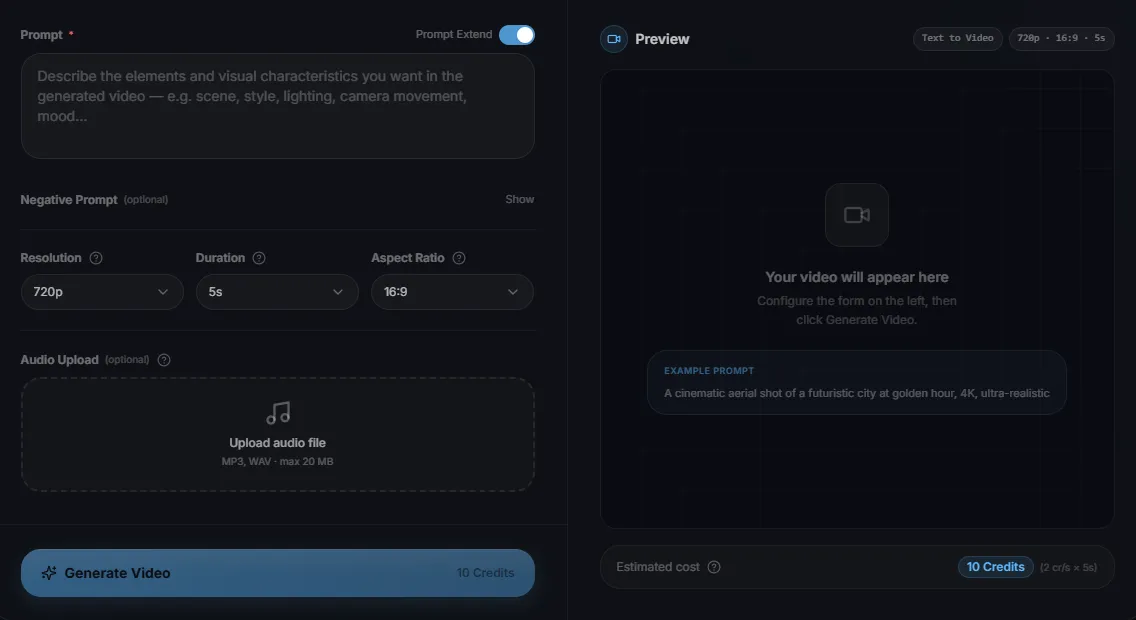
The most direct mode — no images or files required. Describe your scene and Wan 3.0 produces a video with synchronized audio in a single pass.
Step 1 — Select "Text to Video" Mode
Open the Wan 3.0 AI Video Generator and click the Text to Video tab. This is Wan 3.0's most direct mode.

Step 2 — Write Your Prompt
Type a description of your scene in the Prompt field: subject, environment, lighting, camera movement, and mood. Turn on Prompt Extend to let the model enrich your prompt automatically.

Example prompt:
"A cinematic aerial shot of a futuristic city at golden hour, warm amber tones, slow dolly forward, shallow depth of field, ultra-realistic"

Step 3 — (Optional) Upload Audio
Where the current workflow exposes an audio input, upload a file accepted by the generator. Audio behavior depends on the selected workflow.

Step 4 — Set Parameters and Generate
In the current wan30.net generator, choose Resolution (720p or 1080p), Duration (2–15 seconds), and an available Aspect Ratio. Click Generate Video, then use the preview or export options currently shown.

Tip: Add a Negative Prompt to exclude unwanted elements — "blurry, watermark, distorted faces, low quality, flickering."
Follow these steps live — open the Wan 3.0 AI Video Generator and generate your first clip now.
Wan 3.0 responds best to specific, structured prompts. See the difference side-by-side — then apply the formula to your own generations.
Prompt Formula
[Visual Style] + [Subject Description] + [Action / Motion] + [Camera Movement] + [Lighting / Atmosphere]
Example
“Cinematic, photorealistic — a young woman in a red coat walks through a rain-soaked Tokyo street at night, slow dolly forward, neon reflections on wet pavement, shallow depth of field”
“A city at night.”
“A cinematic wide shot of Manhattan at 2 AM — yellow taxi headlights streak through rain, wet asphalt reflects neon signs, slow pan left, ambient street noise, atmospheric fog.”
Add camera direction, lighting conditions, and time of day to ground Wan 3.0's output.
“Make her move.”
“The woman in Image 1 slowly looks up from her book, tucks a strand of hair behind her ear, and smiles softly at the camera — gentle natural light, subtle depth of field shift.”
Describe specific, natural micro-movements — vague motion prompts produce generic results.
“A scene with Image 1.”
“Image 1 (the character) walks through a cobblestone street in Paris at dusk — medium tracking shot, warm golden light, soft bokeh background, cinematic grain.”
Establish shot type and camera behavior before describing the character's action.
Start prompts with the shot type — wide shot, medium shot, close-up, aerial — before describing the subject. Wan 3.0 uses this as a framing anchor. 'Close-up of hands' is clearer than 'show hands.'
When using I2V or R2V, reference assets by number: 'Image 1 is the main character,' 'Video 1 sets the camera style.' Wan 3.0 maps assets in upload order, so position matters.
'She walks' is vague. 'She strides confidently across the frame left to right, pausing to glance back over her shoulder' gives Wan 3.0 specific motion to animate. The more specific the action, the more accurate the result.
Include lighting, color temperature, and mood in the first third of the prompt. 'Golden hour, warm amber tones, shallow depth of field' gives Wan 3.0 a consistent visual identity to apply across the full clip.
The fastest way to internalize these tips is hands-on practice. Open the Wan 3.0 generator and test each prompt pattern — Prompt Extend will enhance your input automatically.
For a complete set of formulas and copy-ready templates, continue to the Wan 3.0 prompt guide.
These examples show prompt directions for current creative workflows without promising a specific output, license, or production result.
Explore short-form concepts using the aspect ratios, audio options, and export controls currently available in the generator.
Sample Prompt
“9:16 vertical, a barista making latte art in a cozy café, close-up shots, warm amber light, ambient coffee shop sounds, cinematic grain, 15 seconds”
Upload a product image and use a prompt to explore a reference-driven product video concept.
Sample Prompt
“Image 1 is a luxury skincare serum bottle — slow 360° rotation, soft studio lighting, white background, water droplets falling, ambient tone”
Wan 3.0 supports multilingual dialogue with lip synchronization; verify each required language and shot before production use.
Sample Prompt
“Image 1 is the brand spokesperson — confident on-camera delivery, modern office setting, warm neutral tones, 16:9, professional voiceover audio from Audio 1”
Use prompts and supported references to guide scene structure and camera intent.
Sample Prompt
“Wide shot of an abandoned lighthouse at dawn — slow push in, fog rolling across rocks, distant seagulls, cinematic grain, no music, atmospheric”
Provide a script and supported references to explore a short lesson concept with native audio-visual generation and subject consistency.
Sample Prompt
“Image 1 (instructor character) explains a chemistry concept at a whiteboard, medium shot, clean academic setting, neutral lighting, Audio 1 provides the narration”
Use a spokesperson prompt and supported brand references to explore a short corporate video concept. Review current terms before commercial use.
Sample Prompt
“Image 1 (executive) delivers a message to camera, medium shot, modern boardroom, daylight through windows, natural delivery, professional audio from Audio 1”
Prefer to create on your phone? Use the Wan 3.0 mobile app for a mobile workflow.
Want to test the workflow before buying credits? Review the Wan 3.0 free option first.
Our support team is ready to help with any questions about Wan 3.0 generation modes, pricing, or technical issues.
Contact SupportNew users receive free credits, and no credit card is required to try the generator. Review the current generator options and applicable terms before exporting or using content commercially.