

Wan 3.0 Prime focuses on faster generation, making it an option for creators who want to review ideas and continue refining them sooner. This guide explains its capabilities, when to choose it over Standard, and how to approach practical video projects.
TL;DR: Wan 3.0 Prime
Prioritize turnaround: Consider Prime when you need to review drafts and respond to feedback quickly.
Give each attempt a purpose: Test an ad opening, explain one concept, or explore a short social clip.
Review before publishing: Faster generation still requires checks for visual accuracy, motion, and audio.
What is Wan 3.0 Prime?
Spend less time waiting between creative decisions.
Wan 3.0 Prime is an accelerated video generation model supporting text, image, video, audio, file, and link inputs. Its capabilities include text-to-video, image-to-video, first-frame or first-and-last-frame guidance, and reference-based generation.
Output options include 480p, 720p, and 1080p, with videos up to 30 seconds.
The practical appeal is the opportunity to shorten the gap between an idea and a result you can evaluate. That matters when the next creative decision depends on seeing the previous attempt.
Wan 3.0 Prime vs Standard: Which Should You Choose?
Choose around your deadline and generation budget.
The Wan 3.0 video generator labels Standard as Lower cost and Prime as Faster. Use those priorities as your starting point.
Decision factor | Prime | Standard |
Main priority | Faster generation | Lower generation cost |
Consider it when | You need feedback sooner | You can allow more time |
Drafting approach | Time-sensitive creative exploration | Budget-conscious experimentation |
Before submitting | Check settings and credits | Check settings and credits |
Prime is worth considering when waiting interrupts your work: a client needs another direction, an opening feels weak, or you want to evaluate a concept before investing more effort. Standard remains a sensible option when you are exploring without a tight deadline.
Also consider the full task. A faster result only helps if it is useful enough to move the project forward. Keep track of how many revisions you need, rather than judging value by a single generation.
Practical Use Cases for Wan 3.0 Prime
Use faster feedback to make clearer creative choices.
The following are suggested applications, with simple ways to approach each task.
Advertising Concepts and Product Video Drafts
An advertising brief may have a clear product but several possible openings. You could introduce it through a close-up, a person using it, or a wider lifestyle scene.
Consider Wan 3.0 Prime for advertising when you need to explore those directions before committing to a finished edit. Keep the product reference consistent and change the opening or camera movement between attempts.
💡 Try this:
Start with one product image and one benefit. Request a simple reveal, review it, then test a different camera approach.
✅ Check:
Product shape, packaging, labels, and any demonstrated function.
Do not assume attractive footage accurately represents the product.
Add precise offer text during editing if generated lettering is unreliable.
Document-Based Explainer Videos
A product sheet or presentation can supply the facts for a short explainer. The creative task is deciding which information belongs on screen and which belongs in narration.
For a document-to-video workflow, begin with a narrow objective: explain one feature, introduce one service, or summarize one process. A dense document needs a clear brief to guide the result.
💡 Try this:
Identify the audience, select two or three relevant facts, and describe a visual sequence that supports them. Ask for concise narration when the selected workflow supports it.
✅ Check:
Names, numbers, claims, and the relationship between the narration and visuals.
A polished scene is not evidence that every detail from the source was interpreted correctly.
Short-Form Social Media Content
Event teasers, brand updates, and short promotional clips often depend on a strong opening and an immediately recognizable subject.
Using Wan 3.0 Prime for social media videos can be useful when you want to explore different treatments of the same message.
Decide whether the clip should inform, demonstrate, or create curiosity before writing the prompt.
💡 Try this:
Build around one action and one message. Choose the intended aspect ratio at the start, then compare openings while keeping the subject consistent.
✅ Check:
Cropping, visual clutter, and whether the message remains understandable without sound.
Leave room for captions or interface overlays when preparing the final edit.
How to Use Wan 3.0 Prime
Start with a clear brief, then refine one decision at a time.
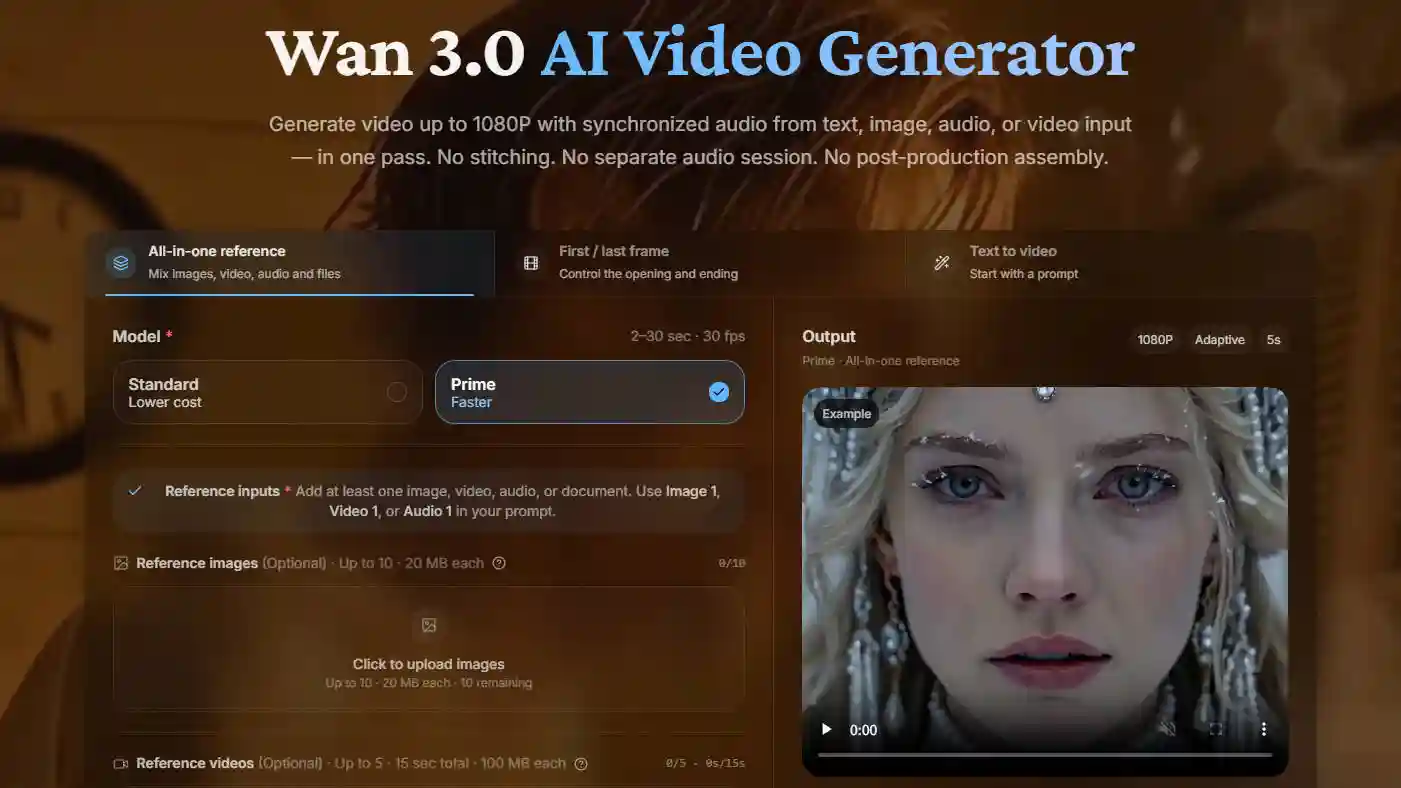
1. Choose Prime and Prepare Your Input
Open the generator, select Prime, and choose the workflow that fits your material.
Add supported references when they help define the subject, appearance, movement, or information.
Before uploading, decide what each reference contributes.
A product image might define appearance;
A document might provide facts.
Remove unnecessary material and follow the reference labels displayed in the interface.
Write a one-sentence goal for yourself, such as Show how this desk lamp fits a quiet reading space. This keeps later decisions focused.
2. Describe the Scene, Motion, and Audio
Effective Wan 3.0 Prime prompts connect visible details with a manageable action.
A useful structure is:
Subject and setting + action + camera movement + visual style + audio direction.
For example:
A ceramic mug sits on a wooden desk beside a rainy window. Steam rises as the camera slowly pushes closer. Soft morning light, realistic textures, gentle rain ambience, no dialogue.
Avoid packing several unrelated events into a short clip. If you need a sequence, explain its order. Replace vague requests such as “make it impressive” with concrete directions about lighting, framing, or movement.
3. Set the Output and Review Credits
Choose duration, resolution, and aspect ratio.
Then review the displayed cost before submitting.
Match the settings to the decision you are trying to make.
For an opening concept, a shorter test may be enough to judge framing and action.
A timing-sensitive explanation needs enough duration to evaluate its delivery.
Avoid requesting a longer clip simply because the option is available.
4. Review and Refine the Result
Watch the whole clip once, then inspect the detail that matters most to the brief. For a product, that might be shape and handling. For an explainer, it might be the accuracy of the spoken message.
Change one major variable per revision.
If the camera is distracting, simplify its movement before also changing the setting and lighting.
This makes it easier to identify which adjustment helped.
Save the prompt and settings alongside useful drafts so you can compare them later.
Start Your Next Video with Prime
Choose one focused concept
Prepare the references it needs
Make a draft you can evaluate.
Wan 3.0 Prime gives speed a practical purpose when each result helps you decide what to improve next.
Wan 3.0 Prime FAQs
Can I reuse a Standard prompt in Prime?
Use it as a starting point, then check the selected mode and supported references. Keep the input and output settings consistent if you want a meaningful comparison, but expect variation between generated results.
Should I include the full script in a document reference?
Include the relevant script, but make the intended excerpt clear. For a short clip, identify the exact message and remove unrelated sections from the brief. Check the generated narration against your intended wording.
What if the video misses the main idea?
Reduce competing instructions. Name the essential subject and action first, then add only the details needed to support them. If the scene still feels overloaded, split the concept into separate clips for editing.
How should I track different versions?
Use descriptive names such as “Mug close-up, slow push-in” and record the prompt, references, settings, and credits. Add a short note about what worked so your next attempt builds on a specific observation.